Fewer Clicks, More Time for Customers: Introducing Engine Awesome Workflows
Workflows put your team's repeatable steps behind one button. Finish jobs, convert leads and log calls with fewer clicks, without writing code.
The job is finished. The clicking isn’t.
Someone still needs to update the status, enter the completion date, close the remaining tasks, and create an invoice. Miss a step, and tomorrow someone has to work out why the job still looks open or the invoice hasn’t been started. Whether you’re moving between software screens or copying rows across spreadsheet tabs, the frustration is familiar: a routine task takes more effort than it should.
Engine Awesome’s new Workflows let you put those repeatable steps behind a button. You choose what happens and in what order. Your team presses it when they’re ready, and the workflow handles the steps you’ve configured, without anyone writing code.
Think of it as a checklist that does itself. Fewer clicks and less retyping leave you more time to answer a customer’s question, follow up on a conversation, or get their next job underway.
To help you picture it in your own business, we’ve created nine interactive demos using sample data. You can try everyday tasks, from converting a lead to closing a project, without affecting a real account. Here are a few ways those workflows can make the day easier.
Finish the job with fewer clicks
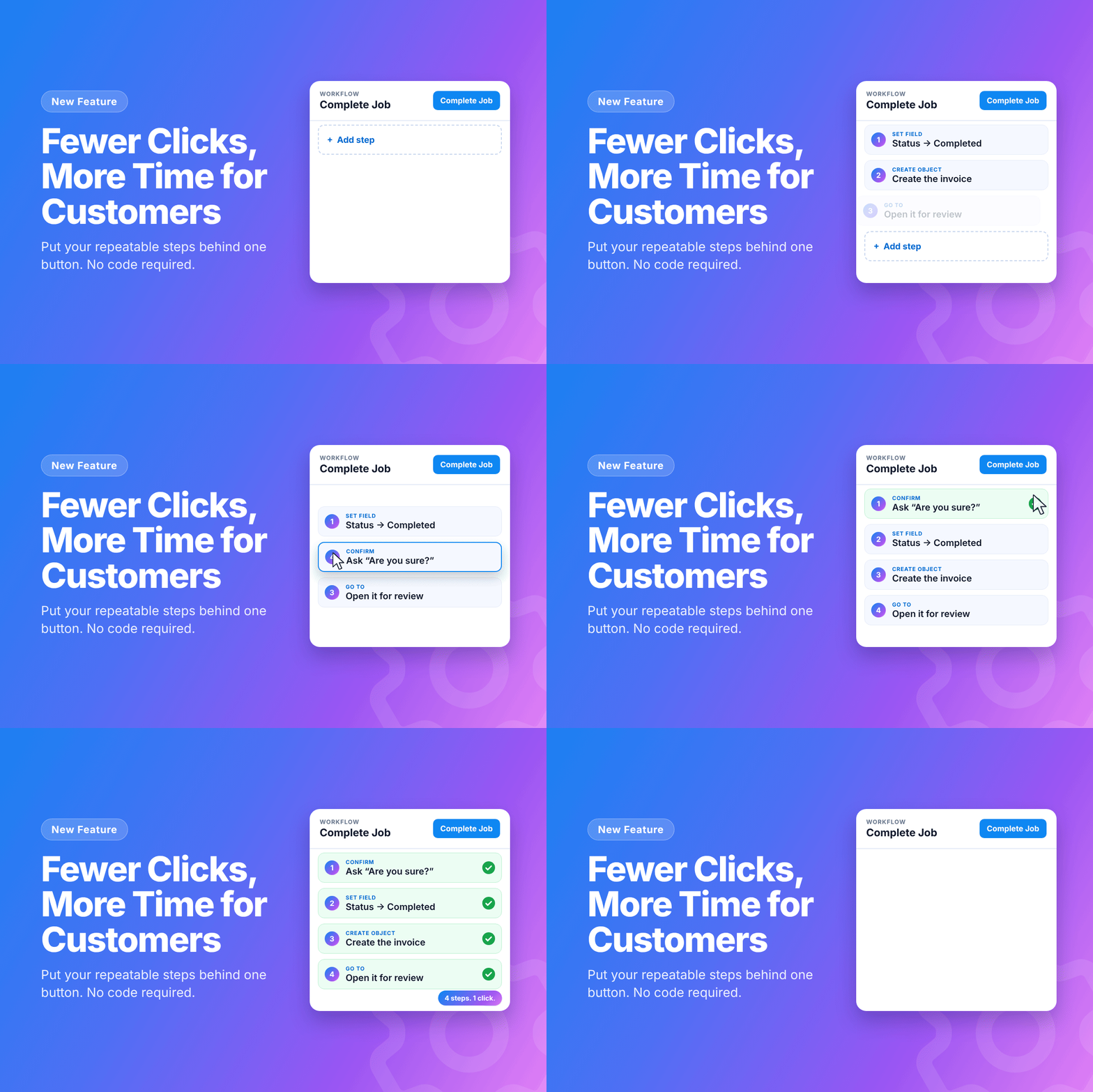
A task that takes a few minutes can seem too small to fix. Repeat it across every job and everyone on your team, and it becomes a regular interruption. With a Complete Job workflow, one button can:
- Mark the job Completed.
- Record today’s date as the completion date.
- Close its remaining open tasks.
- Create an invoice with the job’s details copied over.
- Open the new invoice for review.
You can move straight to reviewing the invoice instead of assembling it from information you’ve already entered. And creating it becomes part of finishing the job, rather than something to remember later. The same principle helps teams whose routines have outgrown a spreadsheet. Instead of copying a row, changing several cells, and remembering what comes next, you can build the sequence into your Engine Awesome application.
Keep control of when the next step happens
Some work needs a person’s judgment. Is the job really finished? Has the lead agreed to go ahead? Is the request ready to approve? A workflow button lets your team make that decision, then run the routine that follows. It starts when someone presses it, so you control the timing while the workflow takes care of the repeatable steps.
You can also configure a button to ask for details or confirmation before anything changes. If the person cancels, nothing happens. That gives your team a useful balance: people decide when to act, and the configured steps run in the same order each time.
Give new customers a smoother start
When a lead says yes, you want to get their work underway. Retyping their details into a customer record and creating their first job can slow that handoff down. In the Convert a Lead demo, a workflow marks the lead Won, creates the customer with their details copied across, and creates their first job. Your team has less duplicate entry to do, and the next stage of work has a record ready to use. You can spend more time helping the customer get started and less time setting up their records.
Capture the details without asking twice
After a customer call, you need to record what happened and decide when to follow up. You shouldn’t also have to type information the application already knows. The Log a Call demo shows a workflow that asks for call details, creates the call record with today’s date and your name, and sets the next follow-up date.
A useful rule when building your own workflows: ask for the information that needs a human answer. Let the workflow fill in known details, such as the date, the person taking the action, or values from a related record. That makes keeping records up to date easier and gives your colleagues context for the next customer conversation. You can spend more of that conversation listening, with fewer details to fill in afterward.
Make the right process easier to follow
A workflow can also check whether an action should go ahead. In the Close Out a Project demo, the workflow checks that every task is Done before completing the job. Press the button too early, and it stops and explains why. The requirement is there when your team needs it. Someone doesn’t have to remember to check a separate list before acting.
You can apply the same thinking to approvals by recording who approved a request and when. Colleagues can find the answer in the record instead of chasing someone for an update.
Start with one routine worth fixing
You don’t need to automate your whole business to make a useful improvement. Look for a routine that happens often, involves several steps, and causes problems when one gets missed. Write down those steps in order. Decide what information the person needs to provide and what should stop the action from going ahead. Then build a workflow around that routine and try it with your team.
As your process changes, you can add, remove, or reorder steps without a developer. Review the workflow when the way you work changes, so the button keeps doing what your team needs.
Start with the task you’re tired of repeating. Every routine you simplify gives your team fewer clicks to work through and more time to focus on customers.
Try the interactive workflow demos to explore the examples and change the steps using sample data.